Introduction
This post belongs to a series, you can find other parts here
The source code will be available on github.com/cedmundo/slang-sdl3-example, feel free to fork it and use it as you find suitable in your projects.
Adding shaders
First, add a simple shader utility by adding a shader.h file:
// shader.h
#ifndef SHADER_H
#define SHADER_H

#include <SDL3/SDL_gpu.h>

typedef struct {
  const char *filename;
  Uint32 sampler_count;
  Uint32 uniform_buffer_count;
  Uint32 storage_buffer_count;
  Uint32 storage_texture_count;
  SDL_GPUShaderStage stage;
} ShaderOptions;

SDL_GPUShader *LoadShader(SDL_GPUDevice *device, ShaderOptions options);
SDL_GPUGraphicsPipeline *CreatePipeline(SDL_GPUDevice *device,
                                        SDL_Window *window,
                                        ShaderOptions vert_options,
                                        ShaderOptions frag_options);
#endif /* SHADER_H */
Those two functions will help us create the pipeline to render things on screen.
// shader.c
#include "shader.h"

#include <SDL3/SDL_assert.h>
#include <SDL3/SDL_filesystem.h>
#include <SDL3/SDL_gpu.h>
#include <SDL3/SDL_log.h>
#include <SDL3/SDL_stdinc.h>

SDL_GPUShader *LoadShader(SDL_GPUDevice *device, ShaderOptions options) {
  SDL_assert(device != NULL);

  char shader_rel_filename[255] = {0};
  SDL_strlcat(shader_rel_filename, SDL_GetBasePath(), 255);
  SDL_strlcat(shader_rel_filename, options.filename, 255);

  SDL_GPUShaderFormat supported_formats = SDL_GetGPUShaderFormats(device);
  if (!(supported_formats & SDL_GPU_SHADERFORMAT_SPIRV)) {
    SDL_Log("Error: GPU device doesn't support SPIR-V shader format");
    return NULL;
  }

  size_t code_size;
  void *code_data = SDL_LoadFile(shader_rel_filename, &code_size);
  if (code_data == NULL) {
    SDL_Log("Couldn't load shader code: %s", SDL_GetError());
    return NULL;
  }

  SDL_GPUShaderCreateInfo shader_create_info = {
      .code = code_data,
      .code_size = code_size,
      .entrypoint = "main",
      .stage = options.stage,
      .format = SDL_GPU_SHADERFORMAT_SPIRV,
      .num_samplers = options.sampler_count,
      .num_uniform_buffers = options.uniform_buffer_count,
      .num_storage_buffers = options.storage_buffer_count,
      .num_storage_textures = options.storage_texture_count,
  };
  SDL_GPUShader *shader = SDL_CreateGPUShader(device, &shader_create_info);
  SDL_Log("Loaded shader: %s", shader_rel_filename);
  SDL_free(code_data);
  return shader;
}

SDL_GPUGraphicsPipeline *CreatePipeline(SDL_GPUDevice *device,
                                        SDL_Window *window,
                                        ShaderOptions vert_options,
                                        ShaderOptions frag_options) {
  SDL_GPUGraphicsPipeline *pipeline = NULL;
  SDL_GPUShader *vert_shader = LoadShader(device, vert_options);
  if (vert_shader == NULL) {
    SDL_Log("Error: failed to load shader: %s %s", vert_options.filename,
            SDL_GetError());
    goto terminate;
  }

  SDL_GPUShader *frag_shader = LoadShader(device, frag_options);
  if (frag_shader == NULL) {
    SDL_Log("Error: failed to load shader: %s %s", frag_options.filename,
            SDL_GetError());
    goto terminate;
  }

  // standard blending for this shader
  SDL_GPUColorTargetBlendState blend_state = {0};
  blend_state.enable_blend = true;
  blend_state.src_color_blendfactor = SDL_GPU_BLENDFACTOR_ONE;
  blend_state.dst_color_blendfactor = SDL_GPU_BLENDFACTOR_ONE_MINUS_SRC_ALPHA;
  blend_state.color_blend_op = SDL_GPU_BLENDOP_ADD;
  blend_state.src_alpha_blendfactor = SDL_GPU_BLENDFACTOR_ONE;
  blend_state.dst_alpha_blendfactor = SDL_GPU_BLENDFACTOR_ONE_MINUS_SRC_ALPHA;
  blend_state.alpha_blend_op = SDL_GPU_BLENDOP_ADD;

  // color configuration with blend state
  SDL_GPUColorTargetDescription color_desc = {0};
  color_desc.format = SDL_GetGPUSwapchainTextureFormat(device, window);
  color_desc.blend_state = blend_state;

  // this are the targets to render (the swapchain texture)
  SDL_GPUGraphicsPipelineTargetInfo color_target_info = {0};
  color_target_info.num_color_targets = 1;
  color_target_info.color_target_descriptions =
      (SDL_GPUColorTargetDescription[]){color_desc};

  // finally we can create the actual pipeline
  SDL_GPUGraphicsPipelineCreateInfo pipeline_create_info = {0};
  pipeline_create_info.target_info = color_target_info;
  pipeline_create_info.fragment_shader = frag_shader;
  pipeline_create_info.vertex_shader = vert_shader;
  pipeline_create_info.primitive_type = SDL_GPU_PRIMITIVETYPE_TRIANGLELIST;
  pipeline = SDL_CreateGPUGraphicsPipeline(device, &pipeline_create_info);

terminate:
  if (vert_shader != NULL) {
    SDL_ReleaseGPUShader(device, vert_shader);
  }

  if (frag_shader != NULL) {
    SDL_ReleaseGPUShader(device, frag_shader);
  }

  return pipeline;
}
Don’t forget to add the source file to the main target:
target_sources(slang-sdl3-example PRIVATE shader.c main.c) # HERE: add shader.c
Then, we can make space for the pipeline in ExampleApp:
// in main.c
typedef struct {
  SDL_Window *window;
  SDL_GPUDevice *device;
  SDL_GPUViewport viewport;

  // HERE: Add those two:
  SDL_GPUGraphicsPipeline *flat_color_pipeline;
} ExampleApp;
Then in the SDL_AppInit function, right after creating the device, we can create
the pipeline too:
SDL_AppResult SDL_AppInit(void **appstate, int argc, char *argv[]) {
  (void)argc;
  (void)argv;

  // <PREVIOUS INITIALIZATION CODE>

  // get resources
  ShaderOptions vert_shader_opts = {0};
  vert_shader_opts.filename = "flat-color.vs.spirv";
  vert_shader_opts.stage = SDL_GPU_SHADERSTAGE_VERTEX;

  ShaderOptions frag_shader_opts = {0};
  frag_shader_opts.filename = "flat-color.fs.spirv";
  frag_shader_opts.stage = SDL_GPU_SHADERSTAGE_FRAGMENT;

  app->flat_color_pipeline = CreatePipeline(app->device, app->window,
                                            vert_shader_opts, frag_shader_opts);
  if (app->flat_color_pipeline == NULL) {
    SDL_Log("Error: failed to create pipeline: %s", SDL_GetError());
    return SDL_APP_FAILURE;
  }

  return SDL_APP_SUCCESS;
}
Now, we update our App_Iterate function to include the rendering of the pipeline:
    // ...
    SDL_GPURenderPass *render_pass =
        SDL_BeginGPURenderPass(cmdbuf, &color_target_info, 1, NULL);
    {
      SDL_SetGPUViewport(render_pass, &app->viewport);

      // This will render the quad on screen
      SDL_BindGPUGraphicsPipeline(render_pass, app->flat_color_pipeline);
      SDL_DrawGPUPrimitives(render_pass, 6, 1, 0, 0);
    }
    // ...
Note the parameter with 6, this is important because we need to render 6 vertices
that will be assigned on the Shader. We do not need to pass any geometry data,
this value is enough to generate VertexID which we will be using.
Finally, do not forget to release the newly created resources, otherwise we will get warnings when closing the application:
void SDL_AppQuit(void *appstate, SDL_AppResult result) {
  ExampleApp *app = (ExampleApp *)appstate;
  if (app == NULL) {
    return;
  }

  SDL_ReleaseGPUGraphicsPipeline(app->device, app->flat_color_pipeline);
  SDL_DestroyGPUDevice(app->device);
  SDL_DestroyWindow(app->window);
  SDL_Log("Info: Terminated with result: %d", result);
}
However, we still can’t run the application since we don’t have the shader source, let’s create the two shaders, first we make the directories to store them:
$ mkdir -p assets/shaders
Then, we start with the vertex shader in assets/shaders/flat-color.vs.slang:
struct VSInput {
  uint vertexID : SV_VertexID;
};

struct VSOutput {
  float4 position : SV_Position;
};

// static quad
static const float2[] quadXYVertices = {
  float2(-0.5f, +0.5f),  // bottom left
  float2(-0.5f, -0.5f),  // top left
  float2(+0.5f, -0.5f),  // top right
  float2(+0.5f, -0.5f),  // top right
  float2(+0.5f, +0.5f),  // bottom right
  float2(-0.5f, +0.5f),  // bottom left
};

[shader("vertex")]
VSOutput main(VSInput input) {
  VSOutput output;
  output.position = float4(quadXYVertices[input.vertexID], 0.0f, 1.0f);
  return output;
}
This shader will only create a quat from thin air, this allow us to work without copying anything to the GPU buffers.
Right after our vertex shader, its natural to create the fragment shader in
assets/shaders/flat-color.fs.slang:
struct PSInput {
  float4 position : SV_Position;
};

struct PSOutput {
  float4 color : SV_Target;
};

[shader("pixel")]
PSOutput main(PSInput input) {
  PSOutput output;
  output.color = float4(1.0f);
  return output;
}
Note the entry point for both fragment and vertex ismain, this is by design,
since we are using the same entry point in shader.c.
Those are the source files, to compile them we need to run the following commands:
$ slangc assets/shaders/flat-color.vs.slang -o cmake-build-debug/flat-color.vs.spirv -entry main -target spirv
$ slangc assets/shaders/flat-color.fs.slang -o cmake-build-debug/flat-color.fs.spirv -entry main -target spirv
The output directory is very important since it is where the executable will try to lookup
the programs (SDL_GetBasePath()). The other options specify our entry point and the target which
is spirv.
Now, we are ready to build and run our application:
$ cmake -B cmake-build-debug -S . && cmake --build cmake-build-debug && ./cmake-build-debug/slang-sdl3-example
-- Configuring done
-- Generating done
-- Build files have been written to: /home/carlos/Projects/Misc/slang-sdl3-example/cmake-build-debug
Consolidate compiler generated dependencies of target slang-sdl3-example
[ 33%] Building C object CMakeFiles/slang-sdl3-example.dir/main.c.o
[ 66%] Linking C executable slang-sdl3-example
[100%] Built target slang-sdl3-example
In my case, there are some warning about the version of Vulkan, I have ignore them for now but if anything breaks for you, the solutions may be in those logs.
If everything is setup correctly you should be able to see a white quad on screen:
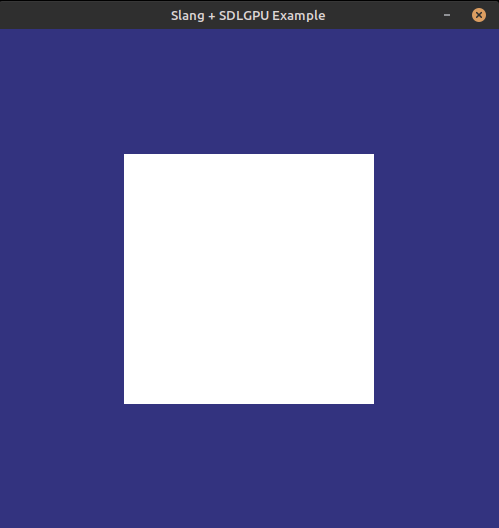
Why it works if we are not binding any geomtry buffers?
Basically, its enough to pass the vertex count to
SDL_DrawGPUPrimitives(render_pass, 6, 1, 0, 0);, in this case, we are passing6, which is the same number of elements in the static quad within the vertex shader:static const float2[] quadXYVertices = {...};, these values can be referenced by using theVertexID.
Important: If it does not work for you, then you may need to pass an actual buffer containing the data, which we will see bellow.
Next steps
Now you have working shaders in your application, please read the next part here.