Introduction
I’m not sure why people consider OpenGL to be an obsolete technology, even though it is still used in newer and recent software, including embedded systems and new game titles.
OpenGL is a simpler API compared to Vulkan, Metal and DX12, and it can be used as introduction to graphics programming. That’s the reason I’m writing this post, since there is almost no available resources that show how to integrate both OpenGL and SDL3 in the same application. Yes, there is an example on ImGUI, but it is not a barebone explanation and has a lot noise that can be a little bit distracting.
Project source code will be available here: github.com/cedmundo/hello-opengl
Requeriments
We will be using the following libraries and tools to build our application:
- Any C compiler compatible with C11 standard
- Any code editor
- CMake 3.22.1
- OpenGL Core 4.1 (runtime, not dev libraries)
- SDL3 v0.5.0 (build from sources, but binary dists also work)
- GLAD (Generated from page)
- Git (optional, but recommended)
And that’s it.
What is GLAD and why it is required
I’m assuming that reader knows what OpenGL and SDL3 are, however, we will be also
using GLAD, which is a runtime OpenGL loader, the reason is that we can’t directly
link to the OpenGL libraries (well, in practice we can but we should not), this component
is responsible for locating the libOpenGL.so and loading its symbols into callable functions.
It’s a very useful piece of software that can be generated here: https://glad.dav1d.de/, and you can configure whatever extensions you may need to your application. If you are not sure what to include, just select:
- Language: C/C++
- Specification: OpenGL
- API/gl: Version 4.1, leave others as None
- Profile: Compatibility
And in extensions, just hit the button Add all. Then make sure that Generate a loader checkbox is on, leave others
unchecked. Then hit Generate.
Project structure
This project follows a simple linear structure, no src and friends, just raw
files with a folder or two to help organize the code better:
hello-opengl/
├── CMakeLists.txt                  - Main build script
├── .git                            - Git files
    └── ...
├── .gitignore                      - Standard ignore file
├── main.c                          - Our main file
└── vendor                          - Third party dependencies in source tree
    ├── CMakeLists.txt              - Build dependencies
    └── glad                        - GLAD generated source
        ├── CMakeLists.txt          - GLAD library (not generated)
        ├── include                 - GLAD Headers
        │   ├── glad
        │   │   └── glad.h
        │   └── KHR
        │       └── khrplatform.h
        └── src                     - GLAD Sources
            └── glad.c
CMake
We are going to be a little hand-waving with CMake configuration, lets start
with hello-opengl/CMakeLists.txt:
# CMakeLists.txt
cmake_minimum_required(VERSION 3.22)
project(hello-opengl
  VERSION "1.0.0"
  DESCRIPTION "Hello OpenGL with SDL3"
  LANGUAGES C)
Here we can change the description, version and project name. Next we setup some configuration options that will be useful later:
# CMake includes and options
set(CMAKE_EXPORT_COMPILE_COMMANDS ON)
set(CMAKE_C_STANDARD 11)

# Third party dependencies
find_package(SDL3 REQUIRED CONFIG COMPONENTS SDL3)
add_subdirectory(vendor)
Note the find_package directive, here we wil be using what SDL3 documentation
says README-cmake. Feel free to
add SDL3 however your configuration fits. After that we will include our
main target:
add_executable(hello-opengl)
target_sources(hello-opengl PRIVATE main.c)
target_link_libraries(hello-opengl PRIVATE SDL3 glad)
The next CMake file will include all vendored dependencies (which may be copied onto the source directory), althrough we are including just glad for now.
In hello-opengl/vendor/CMakeLists.txt we add:
# vendor/CMakeLists.txt
# Source tree dependencies:
add_subdirectory(glad)
And then, for the glad library, we shall copy the contents of the zipped file
within vendor/glad, then add a new CMakeLists in hello-opengl/vendor/glad/CMakeLists.txt:
# vendor/glad/CMakeLists.txt
add_library(glad STATIC)
target_sources(glad PRIVATE src/glad.c)
target_include_directories(glad PUBLIC include)
Main file
Before writing the actual code, let’s start with a simple main.c
// main.c
#include <SDL3/SDL.h>
#include <SDL3/SDL_init.h>
#include <glad/glad.h>

int main() {
  if (!SDL_Init(SDL_INIT_VIDEO)) {
    SDL_Log("Could not initialize SDL: %s", SDL_GetError());
    return -1;
  }

  SDL_Log("Hello OpenGL version %d", GLAD_GL_VERSION_4_1);
  SDL_Quit();
  return 0;
}
To check if we have everything setup correctly, we will run:
$ cmake -B cmake-build-debug -S . && cmake --build cmake-build-debug
It should output something like this:
-- The C compiler identification is GNU 11.4.0
-- Detecting C compiler ABI info
-- Detecting C compiler ABI info - done
-- Check for working C compiler: /usr/bin/cc - skipped
-- Detecting C compile features
-- Detecting C compile features - done
-- Configuring done
-- Generating done
-- Build files have been written to: /home/carlos/Projects/Misc/hello-opengl/cmake-build-debug
[ 25%] Building C object vendor/glad/CMakeFiles/glad.dir/src/glad.c.o
[ 50%] Linking C static library libglad.a
[ 50%] Built target glad
[ 75%] Building C object CMakeFiles/hello-opengl.dir/main.c.o
[100%] Linking C executable hello-opengl
[100%] Built target hello-opengl
If not, check the documentation of SDL3 or the project files in
github.com/cedmundo/hello-opengl,
one common issue that I have, specially in windows, is that M library is not
automatically included, you can add it in CMakeLists.txt:
# ...
target_link_libraries(hello-opengl PRIVATE SDL3 glad m) # HERE: add "m"
# ...
Also, if you have issues linking against SDL3, try with SDL3-shared instead:
# ...
target_link_libraries(hello-opengl PRIVATE SDL3-shared glad m)
# ...
After everything is compiling we should be able to run the program:
$ ./cmake-build-debug/hello-opengl
Hello OpenGL version 0
Sometimes in windows the application won’t start and quit rightaway with a weird
status code. If this is happening, try copying SDL DLLs intocmake-build-debug directory,
you can change CMake to include a custom rule to copy the files automatically, but
for now let’s keep it simple.
Hello OpenGL
Onece we got the base example running, we can write the code needed to execute a simple GL application. First let’s start with the headers:
#include <SDL3/SDL.h>
#include <SDL3/SDL_init.h>
#include <SDL3/SDL_video.h>
#include <glad/glad.h>
We can now set the attributes for OpenGL context here:
  // Initialize application
  if (!SDL_Init(SDL_INIT_VIDEO)) {
    SDL_Log("Error: Could not initialize SDL: %s", SDL_GetError());
    return -1;
  }

  // Set attributes
  SDL_GL_SetAttribute(SDL_GL_CONTEXT_MAJOR_VERSION, 4);
  SDL_GL_SetAttribute(SDL_GL_CONTEXT_MINOR_VERSION, 1);
  SDL_GL_SetAttribute(SDL_GL_CONTEXT_PROFILE_MASK,
                      SDL_GL_CONTEXT_PROFILE_COMPATIBILITY);
Feel free to set the depth, stencil size, or whatever other attribute you need here. After that, we can create the window:
  // Create window
  SDL_Window *window = SDL_CreateWindow("Hello OpenGL", 200, 200, SDL_WINDOW_OPENGL);
  if (!window) {
    SDL_Log("Error: Failed to create window: %s", SDL_GetError());
    return -1;
  }
Note that SDL_WINDOW_OPENGL flag is needed, you can change title and size as needed.
Now, let’s create OpenGL context:
  SDL_GLContext gl_context = SDL_GL_CreateContext(window);
  if (gl_context == NULL) {
    SDL_Log("Error: Failed to create GL context: %s", SDL_GetError());
    return 1;
  }
Once we got a window and a context, we must link the functions from GLAD into
OpenGL runtime, to do that just call gladLoadGLLoader and pass the
SDL_GL_GetProcAddress in similar way we do glfwGetProcAddress in GLFW.
  if (!gladLoadGLLoader((GLADloadproc)SDL_GL_GetProcAddress)) {
    SDL_Log("Error: Failed to initialize GLAD");
    return 1;
  }

  SDL_GL_MakeCurrent(window, gl_context);
  SDL_GL_SetSwapInterval(1);
The last two lines help to claim the context to the window and enable vsync.
Now, we are ready to write actual OpenGL code:
  bool running = true;
  while (running) {
    SDL_Event event;

    // Handle events
    while (SDL_PollEvent(&event)) {
      if (event.type == SDL_EVENT_QUIT ||
          (event.type == SDL_EVENT_WINDOW_CLOSE_REQUESTED &&
           event.window.windowID == SDL_GetWindowID(window))) {
        running = false;
      }
    }

    // Render application
    {
      int w = 0, h = 0;
      SDL_GetWindowSize(window, &w, &h);
      glViewport(0, 0, w, h);

      glClearColor(0.2, 0.2, 0.5, 1.0);
      glClear(GL_COLOR_BUFFER_BIT);
    }
    SDL_GL_SwapWindow(window);
  }
And don’t forget to clear everything afterwards:
  SDL_GL_DestroyContext(gl_context);
  SDL_DestroyWindow(window);
  SDL_Quit();
That should be it! Let’s try compile and run it:
$ cmake -B cmake-build-debug -S . && cmake --build cmake-build-debug && ./cmake-build-debug/hello-opengl
-- Configuring done
-- Generating done
-- Build files have been written to: /home/carlos/Projects/Misc/hello-opengl/cmake-build-debug
Consolidate compiler generated dependencies of target glad
[ 50%] Built target glad
Consolidate compiler generated dependencies of target hello-opengl
[ 75%] Building C object CMakeFiles/hello-opengl.dir/main.c.o
[100%] Linking C executable hello-opengl
[100%] Built target hello-opengl
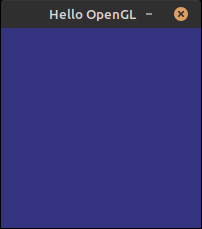
We should be looking a window with a nice blue as background:
Now, we can build our GL application as normal. If you want to learn more about GL, try Learn OpenGL it is a wonderful resource!